
How to Verify a CS2 Tool Download Before Running It
A Windows supply-chain checklist using official domains, hashes, signatures, permissions, and rollback planning.
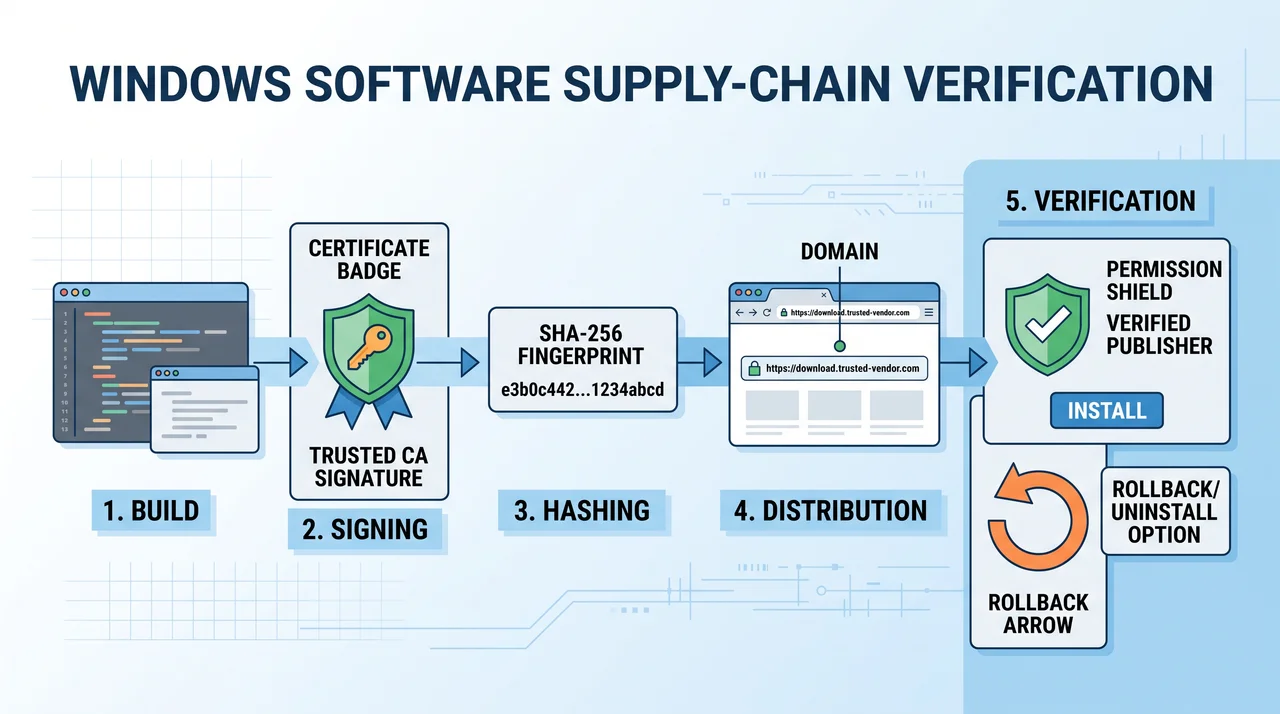
Quick answer: source, identity, integrity, permissions
To verify a CS2 tool download, check four things before opening it: where it came from, who appears to have published it, whether its bytes match a trusted reference, and what privileges it requests. A familiar filename, polished page, or green browser lock is not enough. Use the exact official domain, calculate a SHA-256 hash, inspect any Authenticode signature, review administrative and persistence requests, then define a rollback plan. None of these checks proves software harmless by itself. Together, they create a reproducible stop-or-proceed decision and make a sketchy download much easier to reject.
Verify the distribution path
Start with the route to the file, not the file icon. Type or navigate to the official product domain, confirm the spelling, and use its account or dashboard flow. HTTPS protects the connection to a domain; it does not certify that the domain belongs to the publisher you intended.
Treat links from comments, direct messages, mirrors, URL shorteners, and video descriptions as untrusted until the official site confirms them. Compare the download host with the publisher’s documentation and support references. If the product page, dashboard, and support team point to different domains without explanation, stop.
For a product such as cluster.center, the brand name alone is not verification. Record the exact host, date, displayed version, and support route you used. That small audit trail is useful if the file changes later.
Compute and compare a SHA-256 hash
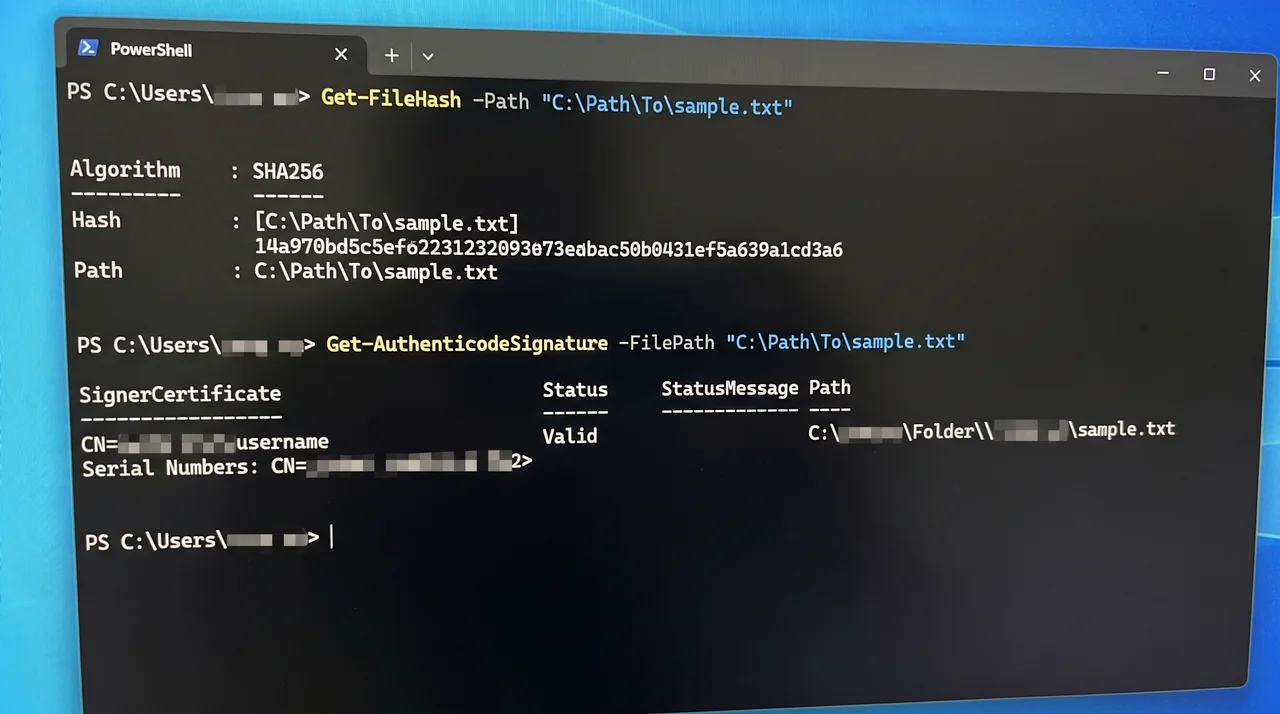
PowerShell can calculate a cryptographic fingerprint without running the file:
Get-FileHash -LiteralPath '.\downloaded-file.exe' -Algorithm SHA256
The result identifies the bytes you received. Save it with the filename and download date. A matching hash is meaningful only when the expected value comes through a trusted, independent channel—such as signed publisher documentation or verified support—not from the same untrusted mirror that supplied the executable.
A hash answers “are these bytes the same?” It does not answer “are these bytes safe?” Malware can also have a perfectly stable SHA-256 value.
Inspect Authenticode identity
Windows can also report an executable’s Authenticode status:
Get-AuthenticodeSignature -LiteralPath '.\downloaded-file.exe' |
    Select-Object Status, StatusMessage, SignerCertificate
Check the status and signer identity, then compare that identity with the publisher’s official documentation. “Valid” means Windows could validate the signature chain and file integrity under its trust rules. It does not mean Microsoft audited the application’s behavior or that the application is harmless. An unsigned file is not automatically malicious either, but it removes one useful identity signal and should raise the evidence bar.
Review permissions and plan recovery
Ask why the program needs each privilege. Unexpected administrator access, startup persistence, new services, unexplained outbound connections, or instructions to weaken Windows protections are strong stop signals. Disabling antivirus or SmartScreen is not a legitimate verification step; it removes evidence precisely when you need more of it.
Before any publisher-specific setup, create a rollback plan. Back up configurations you care about, know how to remove the application through its documented path, keep official support details, and set a stop condition for mismatched hashes, unknown signers, unexplained prompts, or conflicting instructions.
Seven-check preflight
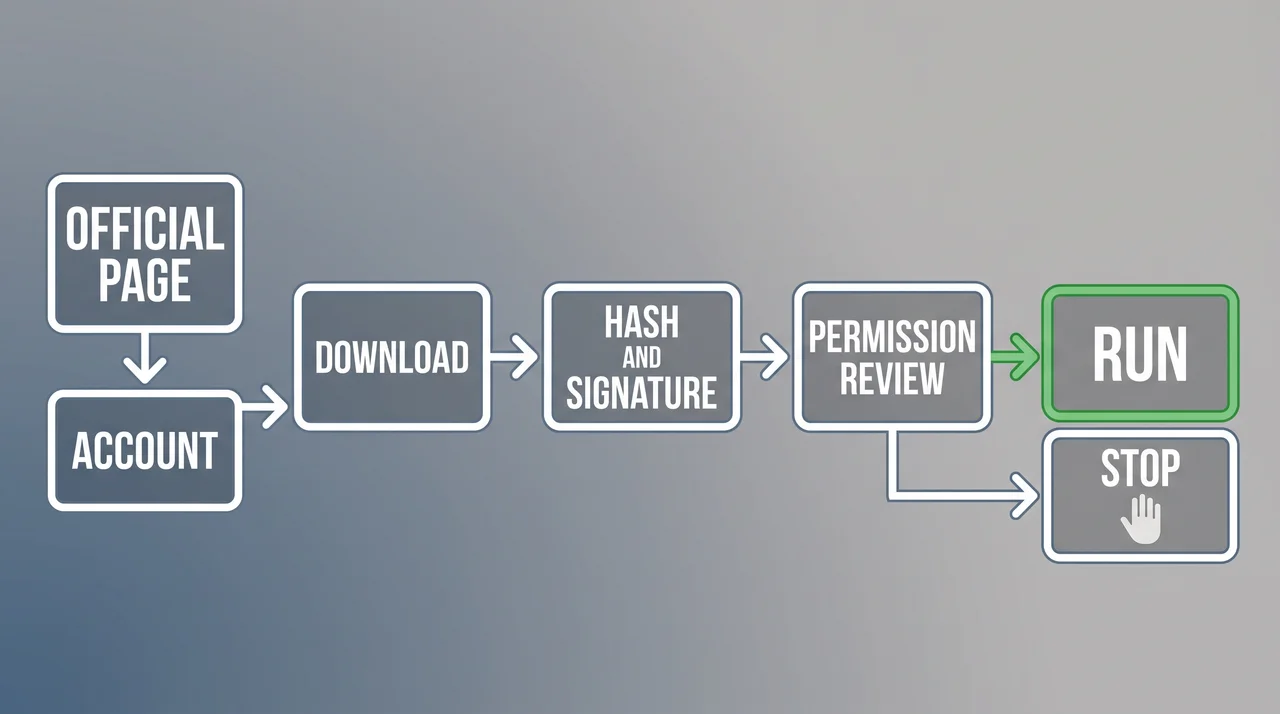
Before opening the file, confirm:
The exact domain came from a trusted official route.
The download host matches current documentation.
The SHA-256 hash matches a trusted independent reference, if provided.
Authenticode status and signer identity make sense.
Requested privileges have a documented reason.
No instruction asks you to disable protection or create exclusions.
You have backups, removal steps, support details, and a stop condition.
Verification should happen before any publisher-specific setup steps. Once the source, file identity, and permissions have been checked, this high-level CS2 setup walkthrough shows the separate account-and-launcher flow; re-check all current instructions against the official product page for cluster cs2 cheatsster cs2 cheats
Keep the verification record beside the download, not only in browser history. A small text note can include the exact domain, retrieval time, filename, SHA-256 value, signer name and status, displayed version, and support case number if one exists. Do not store account secrets in that note. If a later package uses the same filename but a different hash, the record makes the change visible and gives support a precise question to answer.
Re-run the identity checks after every fresh download. A previous version’s signature or hash says nothing about new bytes. If the trusted reference has not been updated, treat the mismatch as unresolved rather than assuming it is a routine patch.
Conclusion
Good download hygiene is deliberately boring: confirm the path, fingerprint the bytes, inspect identity, keep privileges narrow, and preserve a way back. If any part cannot be explained, stop and contact official support. Running first and investigating later reverses the safe order.
FAQ
Does matching a SHA-256 hash prove a file is safe?
No. It proves the file matches a reference value. The reference must also be trustworthy, and matching bytes can still contain harmful behavior.
What does a valid Authenticode signature prove?
It supports signer identity and file integrity under Windows trust rules. It does not certify that the program is harmless.
Should I disable antivirus when a launcher is blocked?
No. Keep protection enabled, stop, verify the source and signer, and ask official support for an explanation.
What if the publisher provides no hash or signer information?
To verify a CS2 tool download with fewer publisher signals, raise the evidence bar. Confirm the official path, question every privilege, and do not proceed if identity remains unclear.
About the author
- I talk about game hacking and game cheats. I have been developing game protection—as well as cheats—for over 10 years.
Comments
Join the discussionNo comments yet. Be the first to comment.